
Personalized Outbound Strategy
Get The Right Outbound Strategy In Minutes
Enter your email to get a custom plan & stack recommendation for your business
It's being carefully crafted by AI
Please check your mailbox in 5 minutes
You sent the connection request. Prospect accepted. You sent the first message. They replied.
And then your day got busy.
By the time you got back to that conversation, the lead had gone cold. Not because they were not interested, but because nobody was there when the momentum was there.
That is the part of LinkedIn outreach that most tools completely ignore. Getting replies is no longer the hard part.
What happens inside those conversations, the back and forth, the objections, the follow-ups, the scheduling, that is where pipeline leaks.
Periodix is built specifically for that moment. It reads incoming LinkedIn replies, understands the context of the full conversation, responds on your behalf, and moves the lead toward a booked call. All of it without you opening the inbox.
The promise is straightforward: an AI agent that reads every reply, handles the conversation, and books the call, without you touching the inbox.
Before committing, I dug into what real users had to say. One reviewer flagged limited personalization at scale. Another mentioned that the platform gets complicated to navigate early on. A third noted that CSV imports and workflow flexibility need work as usage grows.
Those are real concerns worth investigating before you spend a dollar.
Read this before you decide.
Yes, if LinkedIn reply management is the one gap in your outbound motion.
Bottom line: Periodix is worth it if your only problem is managing LinkedIn conversations at scale. It is a poor fit if you need email outreach, lead sourcing, or a complete outbound system.
If those gaps matter to you, Agent Frank inside Salesforge covers the full motion, from finding prospects to booking calls, across both email and LinkedIn, without the per-lead overage costs.

Periodix is a LinkedIn-first AI sales agent built to manage conversations after prospects enter your LinkedIn workflow. It helps write messages, respond to replies, handle objections, re-engage cold leads, and book calls.
The important distinction is that Periodix is not a full outbound stack. It does not replace lead sourcing, cold email, mailbox infrastructure, or deliverability management.
It is best understood as a LinkedIn conversation and conversion layer.
It works in two modes. Autopilot responds independently, no human needed. Copilot drafts a response and waits for your approval before sending. You pick what fits your process.
If someone replied "not now" three months ago, Periodix goes back with a different message. You do not have to remember to do that manually.
Periodix sits somewhere between LinkedIn outreach automation and AI reply management.
It can help create messages, follow up, re-engage leads, handle replies, and book calls.
But it is not a full outbound system because it does not cover lead sourcing, cold email, inbox infrastructure, or deliverability.
So it is best understood as a LinkedIn-first sales conversion agent, not a complete SDR platform.

It reads the full conversation history before responding. Replies feel natural, not templated. Users reported stronger engagement compared to manual follow-ups.
One user sent 10 messages over five months before a lead responded and booked a call. Periodix keeps going back with updated context, not the same message repeated.

When users hit issues during setup, the team was accessible and helpful.
Once a lead shows interest, Periodix shares the calendar link, confirms the meeting, and sends a reminder. One user reported 11 calls booked in a single month without touching the inbox.

A COO-level G2 reviewer flagged limited room for personalization at high volume. You cannot fine-tune tone or messaging style per segment.

One reviewer called out the lack of CSV import as a blocker for scaling. Getting large lead lists into Periodix takes more manual work than it should.
Multiple reviewers mentioned the platform feels complicated early on. There is a learning curve before the automation runs the way you expect.
No cold email outreach. If your outbound runs across both channels, you need a second tool, which adds cost and splits your workflow.
Periodix depends heavily on the quality of your existing LinkedIn lead list and initial outreach strategy. If your targeting is weak, the AI agent can manage conversations, but it cannot fix poor lead selection.
Once you exceed your monthly prospect limit, you pay per additional revived lead. For high-volume teams, that variable cost makes budgeting harder month to month.
👉 Run LinkedIn and email outreach from one platform with Salesforge
Periodix runs as a LinkedIn-based outreach system. You set it up once, and it handles the conversation from first reply to booked call.
Here is the basic flow.
You send connection requests to your target list. When someone accepts and replies, the Sales Conversion Agent takes over. It reads the full conversation history before responding.
That context matters. If a lead said "not interested" two months ago, Periodix does not send the same message again. It adjusts based on what was said before.
The agent then categorizes each lead. Interested. Objecting. Gone cold. Each category triggers a different response path.
For interested leads, it moves toward booking a call. It shares your Calendly link, confirms the meeting, and sends a reminder before the call. You just show up.
For cold leads, it sends re-engagement messages over time. One team in the data ran 10 follow-ups over five months before finally getting a response and booking a call.
You choose between Autopilot or Copilot mode depending on how much control you want over outgoing messages.
Periodix is built around one workflow: taking a LinkedIn conversation from first reply to booked call. Here is what each feature does inside that workflow.
This is the core of what Periodix does. It reads every incoming reply, identifies where the lead stands in the conversation, and responds without you doing anything.
If a lead says, "Sounds interesting, tell me more," the agent picks that up and moves the conversation toward a call.
It also handles objections; if someone says "we already use a tool for this," the agent responds with a relevant counter, not a generic template. You do not write a single word.
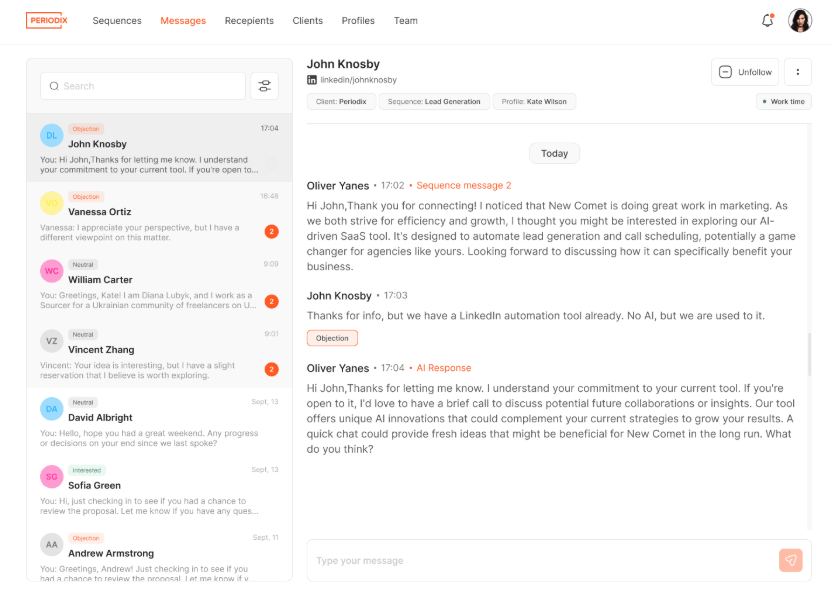
When a lead replies and is still active in the chat, the agent responds immediately. This matters because most leads disengage if they do not hear back within minutes.
The agent catches that window and keeps the conversation going while the lead is still paying attention.

Every reply gets a label: interested, objecting, or cold. That label decides what happens next. An interested lead gets pushed toward a call.
An objecting lead gets a response that addresses the specific concern raised. A cold lead gets added to a re-engagement queue automatically. Nothing falls through manually.
For leads who went silent, Periodix sends follow-ups over time. Not the same message repeated, a different angle each time, using the full context of previous messages.
One example from the data: 10 follow-ups over five months before a lead finally responded and booked a call.
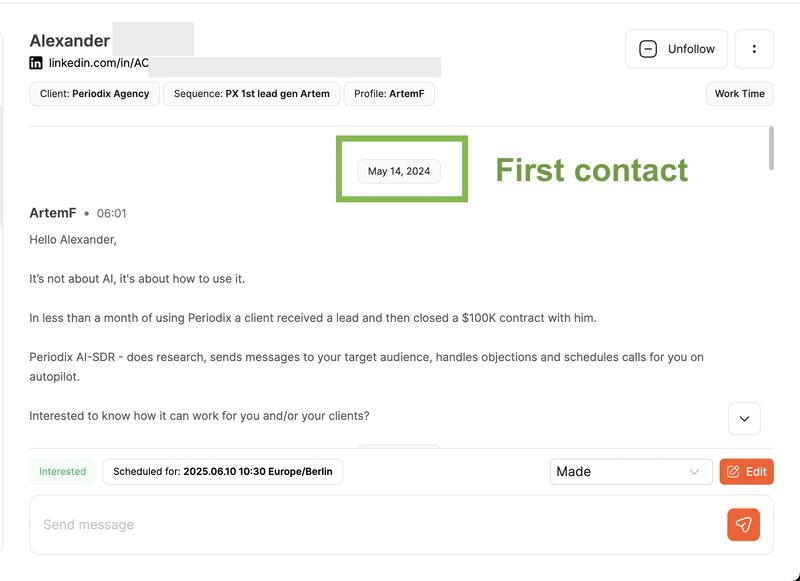
The agent does not give up, and you do not have to remember to follow up either.


Once a lead agrees to a call, Periodix shares your calendar link, confirms the booking, and sends a reminder before the meeting.
No-show rates drop because the reminder goes out automatically without anyone on your team tracking it. You show up to a call that was fully set up without your involvement.
If you want to review responses before they go out, Copilot mode queues them for your approval.
You see what the agent plans to send, edit if needed, and approve. It gives you control without requiring you to write from scratch.
Useful when you are testing new messaging or handling high-value accounts where tone matters more.

Agencies managing multiple LinkedIn profiles get one shared inbox. All conversations across all profiles sit in one place.
You do not need to switch between accounts to stay on top of replies.
Team members can also be assigned access based on their role, which helps when multiple people are managing outreach for different clients.
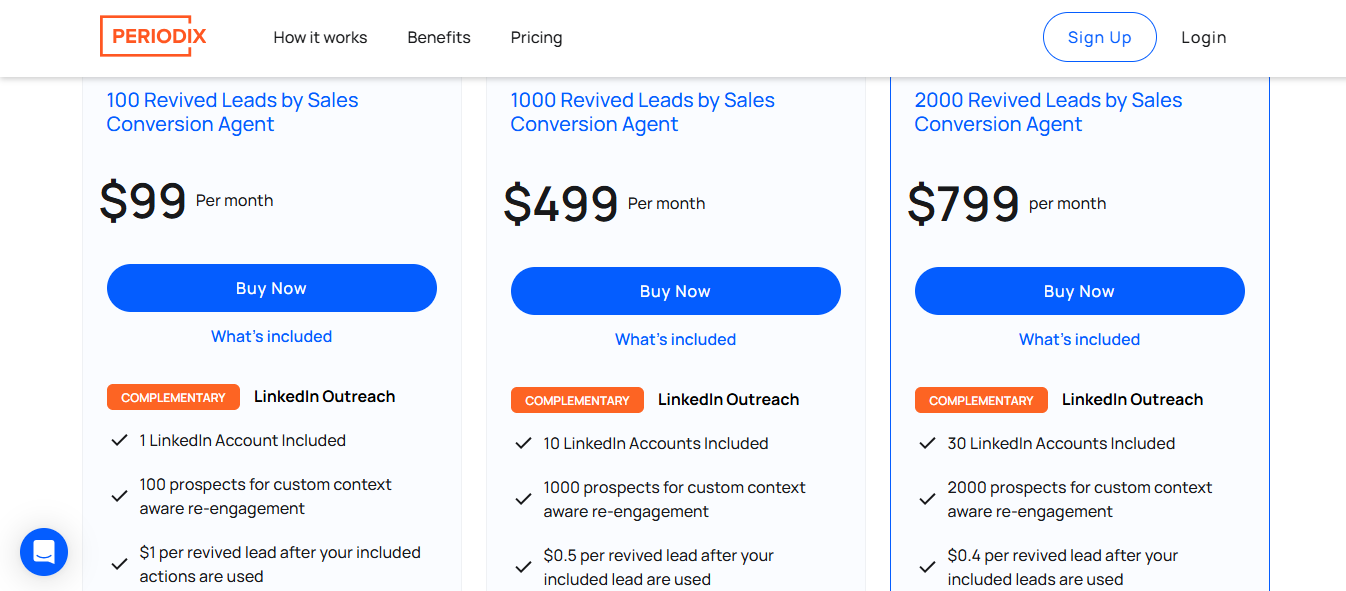
Periodix charges based on how many prospects the Sales Conversion Agent re-engages each month.
All plans include the Sales Conversion Agent, unlimited sequences, lead categorization, Copilot mode, and automated nurturing.
Periodix offers a 14-day money-back guarantee across all plans.
If your buyers live on LinkedIn and you run outreach there daily, Periodix removes the manual work of managing replies across multiple conversations.
If you are sending hundreds of connection requests a week and cannot keep up with responses, the Sales Conversion Agent covers that gap without you hiring more people.
If your CRM has 1st-degree connections who never converted, Periodix re-engages them with context from previous conversations. You do not need to start from scratch.
If you run outreach for multiple clients, the shared inbox and multi-profile management save significant time across accounts.
If any of those last four points describe your situation, Periodix will likely create friction rather than remove it.
Periodix is strongest inside LinkedIn conversation automation. It helps continue conversations, revive cold leads, handle objections, and move interested prospects toward calls.
But it does not cover the full outbound system around that workflow: lead sourcing, cold email, inbox infrastructure, deliverability, and multichannel sequencing.
If you are running outbound at any real volume, that covers maybe 20% of the work.
The other 80% is where Salesforge stack steps in.
You bring your own contacts. You deal with CSV import limitations. You figure out enrichment separately. With Salesforge, Leadsforge sits inside the same ecosystem.
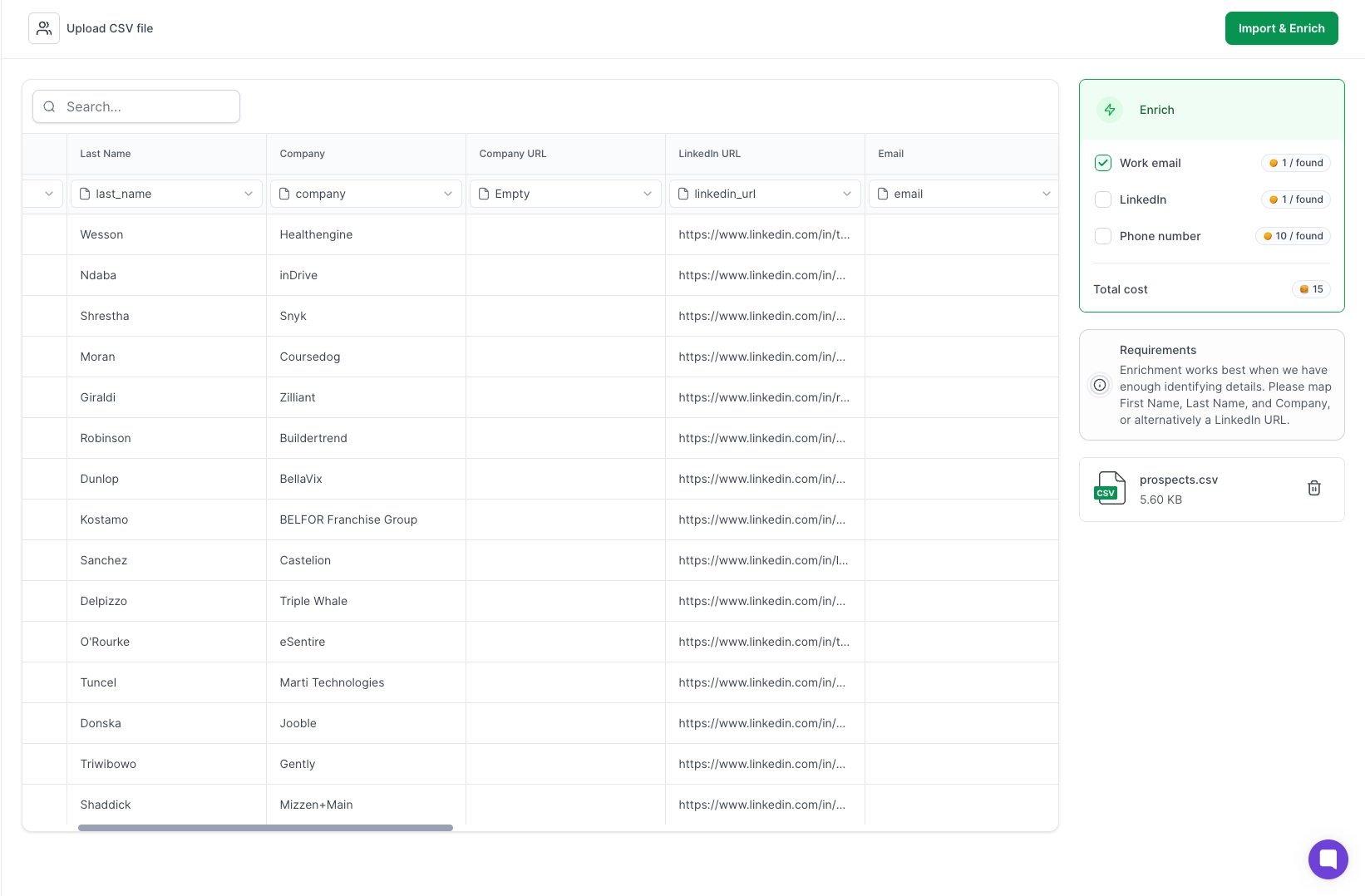
You describe your ICP, pull verified contacts from a 500M+ database, and push them directly into a sequence. No switching tools. No import friction.
When a LinkedIn lead goes cold, Periodix keeps sending LinkedIn messages. That is the only move it has. Salesforge runs email and LinkedIn sequences together.

If a lead does not respond on LinkedIn, an email goes out automatically. You stay in front of the right person across both channels without building a second workflow.
Deliverability is not Periodix's problem to solve; it is yours. Salesforge connects directly to Mailforge, Primeforge, Infraforge, and Warmforge.
Your domains are set up, your mailboxes are warmed, and your sender reputation is monitored from inside the same system. You do not manage deliverability separately.
It picks up after someone replies. Everything before that, finding the prospect, writing the outreach, sending the connection request, and crafting the first message, falls on you or your team.
Agent Frank inside Salesforge takes care of the overall prospecting flow.
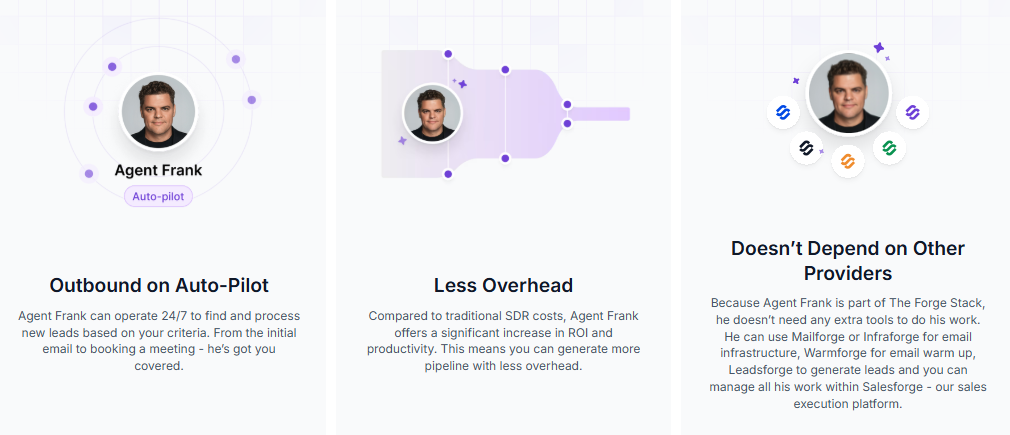
He finds prospects based on your ICP, writes personalized outreach, sends connection requests and emails, follows up, handles replies, and books meetings.
There is also a layer that most outbound tools do not have yet. Salesforge connects to AI assistants like Claude via the Forge MCP Server.
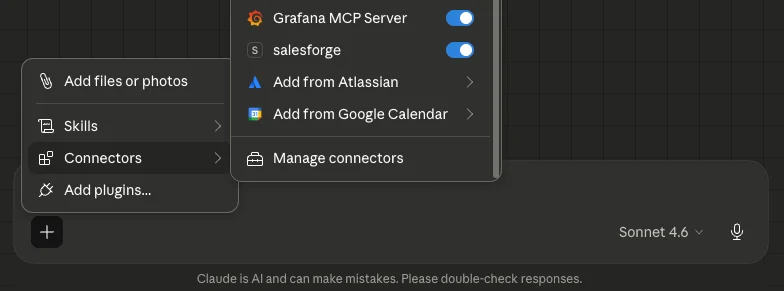
Instead of clicking through dashboards, you can run your entire outbound workflow through natural language prompts, find leads in Leadsforge, build LinkedIn and email sequences, manage mailboxes, and track campaign performance, all from one conversational interface.

For teams moving toward agentic outbound, that infrastructure is already built.
Periodix has no equivalent. You manage everything through the dashboard manually.
How to Automate Cold Email With Claude Code and Salesforge MCP
Enter your email to get a custom plan & stack recommendation for your business
Please check your mailbox in 5 minutes

Periodix is strong for LinkedIn conversation automation, re-engagement, objection handling, and call booking.
But it is not a complete outbound stack because it does not cover lead sourcing, cold email, deliverability, or full multichannel execution.
It picks up after someone replies on LinkedIn and takes the conversation toward a call. For that specific job, it works.
But here is what you still need to figure out on your own:
So, should I use Salesforge instead of Periodix? If you want one system that covers all of the above, yes.
Salesforge runs email and LinkedIn together. Leadsforge finds your leads. Warmforge, Mailforge, and Primeforge handle deliverability. Agent Frank runs the entire SDR workflow without you managing any of it.
No overage costs. No missing channels. No five-tool stack held together with hope.
Start your free trial, no credit card required. Or hire Agent Frank and let him handle the rest.
.jpg)

.jpg)

.jpg)